mirror of
https://github.com/andsyrovatko/s4k-admin-toolbox.git
synced 2026-08-31 10:06:07 +02:00
 syr4ok
7ac0ad8922
syr4ok
7ac0ad8922
Key improvements and features:
- Automated IPAM: Scans for available /24 subnets within a defined BASE_NET range.
- Native OS Integration: Forces static bridge names using 'com.docker.network.bridge.name' for easier netfilter/iptables rules.
- Infrastructure Persistence: Tracks managed networks via a flat-file database (NET_FILE).
- Safety Mechanisms:
    - Enforced 15-char limit for Linux interface compatibility.
    - ShellCheck-validated code with 'set -euo pipefail' (Strict Mode).
    - Interactive confirmation for bulk decommissioning.
- Comprehensive Dashboard: Provides 'info' command for real-time network status and IP range overview.
🐳 Docker Network Manager
A lightweight, production-ready Bash utility to manage external Docker bridge networks with automatic IPAM (IP Address Management). It ensures your network configurations are persistent, documented, and free from subnet overlaps.
🚀 Key Features
- Smart Subnet Allocation: Automatically finds the next available /24 block within your specified range (e.g.,
172.30.x.x). - Infrastructure as Code (Lite): Keep your network names in a simple text file; the script handles the rest.
- Safe Operations:
- Interactive confirmation for bulk deletions.
- ShellCheck-validated code (Strict Mode:
set -euo pipefail). - Non-interactive mode support (via
FORCE=true).
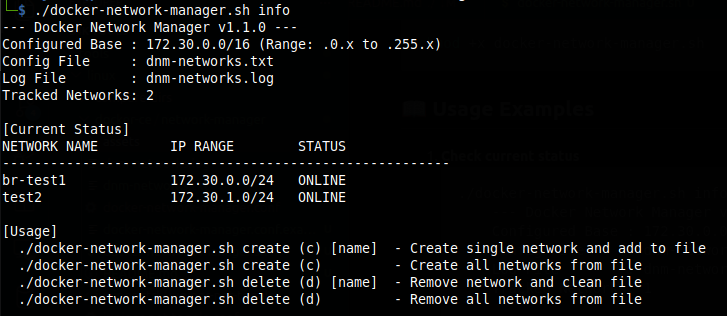
- Status Dashboard: Instant overview of which tracked networks are
ONLINEorOFFLINE.
🛠 Installation & Setup
- Clone the repo (or add the code to your admin toolbox).
- Create the config file:
cp docker-network-manager.conf.example docker-network-manager.conf
#OR
cat <<EOF > docker-network-manager.conf
NET_FILE="./dnm-networks.txt"
LOG_FILE="./dnm-networks.log"
BASE_NET="172.30"
START_OCTET=0
END_OCTET=255
EOF
- Make script executable:
chmod +x docker-network-manager.sh
📖 Usage Examples
- Check current status
Example:
./docker-network-manager.sh info
- Provision networks
- From file: Add network names to dnm-networks.txt and run:
./docker-network-manager.sh create - Single network:
./docker-network-manager.sh create br-project-alpha
- From file: Add network names to dnm-networks.txt and run:
- Decommission networks
- Remove and cleanup:
./docker-network-manager.sh delete br-project-alpha - Purge all (from file):*
./docker-network-manager.sh delete
- Remove and cleanup:

⚠️ IMPORTANT
Interface Name Limit: Linux has a 15-character limit for network interface names. Ensure your Docker network names stay within this limit to maintain consistent bridge naming.
🧩 Native OS Integration
Unlike standard Docker networks that create cryptic interface names (e.g., br-837d9f...), this manager assigns the actual network name to the Linux bridge interface.
This allows you to:
- Monitor traffic per-network using standard tools (tcpdump -i br-test1).
- Create persistent firewall rules (IPTables/NFTables) targeting specific bridges.
- Easily identify networks in ip addr or ifconfig output.
Example:


📊 Summary Table of Commands
| Command | Short | Argument | Description |
|---|---|---|---|
create |
c |
[name] | Provisions network(s) and updates config file. |
delete |
d |
[name] | Removes network(s) from Docker and config file. |
info |
i |
- | Displays dashboard with IP ranges and statuses. |
⚙️ Configuration Variables
| Variable | Default | Description |
|---|---|---|
BASE_NET |
172.30 |
The first two octets of your managed pool. |
START_OCTET |
0 |
Starting range for the 3rd octet. |
END_OCTET |
255 |
Ending range for the 3rd octet. |
NET_FILE |
./dnm-networks.txt |
File where network names are stored. |
⚖️ License
MIT LICENSE. Free to use and modify.